
Roadside Electronic Parking (Upcoming)
Find out more about what REP is and how it can make roadside parking easier in future, where you'll be able to start and end your parking session with a tap.
Last updated on 24 August 2026
What is Roadside Electronic Parking (REP)
REP is a future functionality of the ERP 2.0 system, which will be enabled after the On-Board Unit (OBU) installation exercise has been completed. REP allows parking charges to be automatically calculated and deducted through the OBU for roadside parking. You will need to install the OBU touchscreen display that is provided as part of the OBU to use this feature.
To commence a parking session, all you need to do is to tap on the OBU touchscreen display to confirm that the correct parking place has been detected. Find out more about the OBU installation exercise (opens in new tab).
How to use the Roadside Electronic Parking function
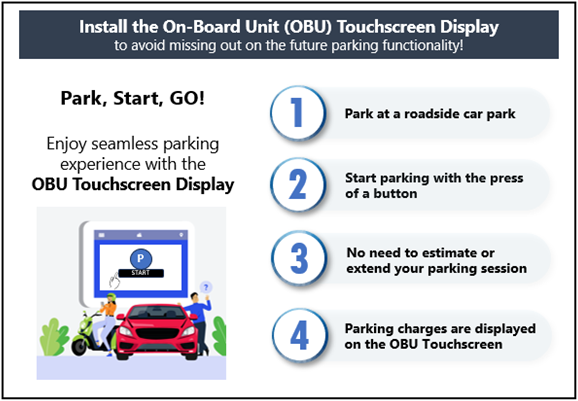
Once you have parked your vehicle at a roadside parking lot, a parking prompt to start parking will appear when your vehicle’s engine is switched off.
To start the session, select the car park and tap the “start parking” button on the touchscreen display.
To end parking session, simply drive out from the car park and the parking charges will be automatically calculated, displayed on the OBU touchscreen display and deducted based on your preferred payment mode for ERP (i.e. CEPAS card or ERP2.0 backend payment service).
Useful features
Comparison of OBU and Parking.sg features
Useful Features | OBU | Parking.sg |
|---|---|---|
Need not estimate or extend parking duration. | ✓ | Not available |
Parking session ends automatically when vehicle exits the car park. | ✓ | Not available |
Parking charges will be displayed on the OBU touchscreen display once parking session ends. | ✓ | Not available |
In addition, the OBU touchscreen display offers other convenient features, such as displaying traffic advisories, your CEPAS card balance, and settings options.
Frequently asked questions
When will I be able to pay for roadside parking through my OBU?
Roadside Electronic Parking (REP) will be implemented after the OBU installation exercise has been completed. In the meantime, you can continue to use Parking.sg to pay for parking digitally.
If you have chosen not to install the OBU touchscreen display, you will not be able to access the REP function. You may continue to use Parking.sg to pay for parking digitally.
Why is REP only available with the touchscreen display? What options do I have if I don't want to install the touchscreen display?
REP relies on the OBU’s location detection system to detect the correct parking location. However, location accuracy may sometimes vary, especially in highly urbanised environments. Therefore, before starting your parking session, you will need to confirm via the touchscreen display that your parking place as detected by the OBU is correct. The touchscreen display also allows you to review your accumulated parking charge before you terminate the parking session by moving off. You may continue using the Parking.sg app to pay for parking digitally if you do not install the touchscreen display.
Are motorcycles, which are only fitted with a single-piece OBU, able to access the REP?
Yes. Motorcycles fitted with the single-piece OBU can pay for parking using REP.
Can I use Parking.sg and the REP at the same time?
Motorists can use either system to start a parking session. We encourage you to use REP as the process is simpler – you will only need to confirm your parking location before starting your parking session, and it will end automatically when you drive off. With REP, you do not need to estimate your parking duration or manually extend/end your session, unlike Parking.sg.
Other than Parking.sg app, can I use other OBU compatible third-party app such as those listed below, for parking payment?
ERP 2.0,
Breeze,
Galactio,
Motorist Super App
Parking payment is not available with OBU compatible third-party apps. You can only pay for parking via the OBU touchscreen display when REP is implemented, or by using Parking.sg. We encourage motorists to install the OBU touchscreen display to enjoy the conveniences offered by REP.
Can I continue to use Parking.sg to pay for parking?
We encourage you to install the OBU touchscreen display which offers a more seamless parking experience as your parking session ends automatically when you drive off. You do not need to estimate your parking duration or manually extend/end your parking session. You will also be able to enjoy other features such as traffic information/advisories, CEPAS card balance and settings. If you do not install the OBU touchscreen display, you can continue to use the Parking.sg app to pay for parking.
I have installed the OBU. What number do I key in under the “IU number” field, for my URA season parking applications?
If you switched your existing IU to the new OBU, you do not need to update anything as the OBU label is the same as your IU number. If you installed an OBU on your newly purchased vehicle, enter your OBU label under the IU number field for URA season parking applications.
What will happen to parking coupons when REP is launched? Can they still be used or are there plans to phase them out? If there plans to phase them out, when will that take place?
The vast majority of public car parks today are already either operating under the Electronic Parking System (EPS) or have parking fees paid through Parking.sg. With the upcoming launch of the REP, we expect usage of electronic means for parking payments to increase further, given the added convenience they offer to motorists.
Relevant agencies will review the future role for parking coupons in Singapore’s public parking landscape, in tandem with the implementation of REP. More details on the REP will be shared in due course.
For other information on OBU, please visit LTA’s OneMotoring website (opens in new tab).