
Instil (DC Services & Good Practices)
Appeal to Properly Name CAD & BIM Files for Development Applications
21 October 2020
Some 60% of Computer Aided Design (CAD) and Building Information Modelling (BIM) files submitted electronically still do not comply with URA’s CAD submission guidelines [PDF, 342 KB] (opens in new tab) and BCA’s BIM e-submission guidelines (opens in new tab). This has made it difficult to identify the correct files easily and quickly, causing unnecessary delays when retrieving the files for processing work.
We seek the co-operation and understanding of all Qualified Persons and Professional Engineers to immediately adhere to the proper CAD & BIM file naming conventions to improve the development application process.
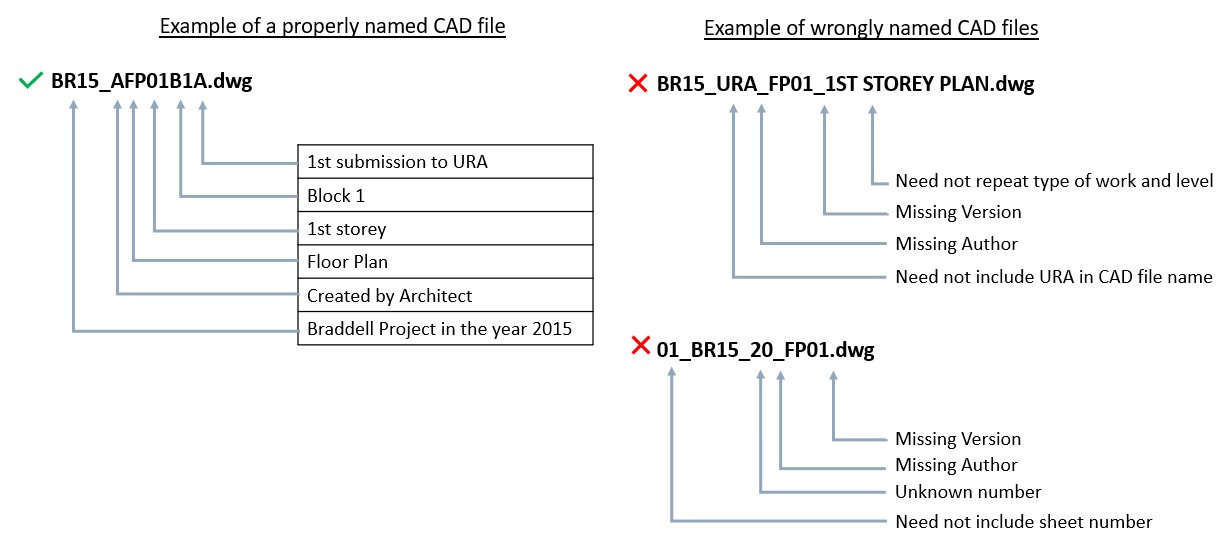
Naming CAD Files
CAD files should be named as follows:
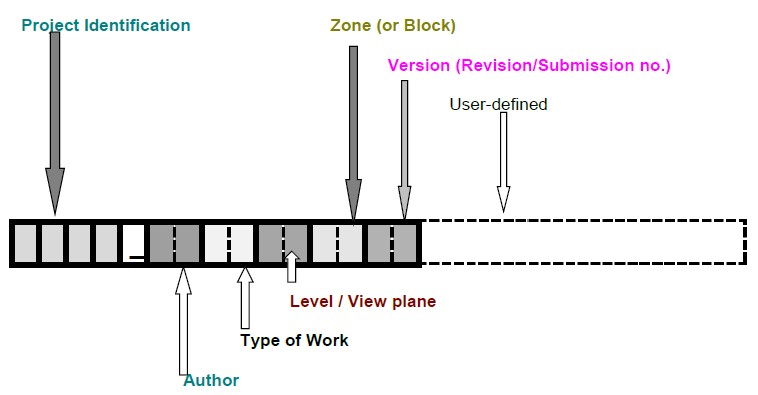
Project Identification: A user-defined field to specify the project. E.g. MLP1 for Merlion Park Project.
Author: The individual/company/organisation responsible for creating the file. E.g. A for Architect.
Types of Work: The types of information being represented on plan. E.g. SP for Site Plan, FP for Floor Plan, and so on.
Level/View Plane: The level of the development or view plane being represented on plan. E.g. 02 for 2nd storey, A for Attic, BB for Section BB and NE for northeast elevation plan.
Zone or Block: The zone or block being represented on plan. E.g. 01 for Block 1, A1 for Zone A1.
Version (Revision/Submission No.): The version of the plans being submitted. E.g. A for 1st submission, B for 2nd submission, C for 3rd submission.
A full list of standardised acronyms can be found in the CAD submission guidelines.
Naming BIM Files
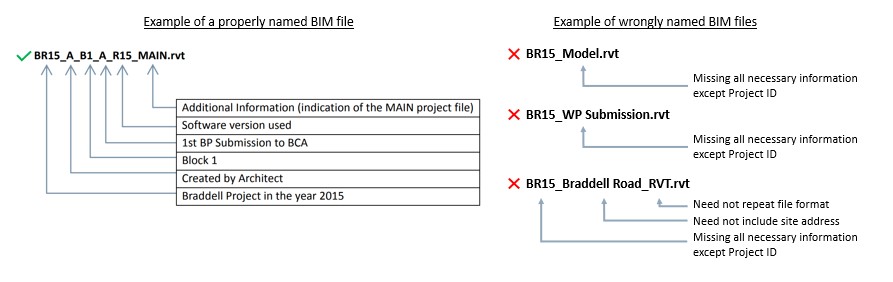
BIM files should be named as follows:

Project ID: A user-defined project reference number (max. 6 characters)
Author: The individual/company/organisation responsible for creating the file (max. 2 characters)
Model Part: The zones, blocks, levels of trades being represented in the file (max. 6 characters)
Submission Version: The version number submitted to each agency (max. 1 character) E.g. A for 1st submission, B for 2nd submission and so on.
Software Version: The software version used and submitted to each agency (max. 3 characters, which should be the last 3 characters of the software version used)
Additional Information: This is determined by the user. A good practice is to indicate the federated model as a MAIN file (max. 6 characters)
A full list of standardised acronyms can be found in the BIM e-submission guidelines.
Banner image by ThisisEngineering RAEng on Unsplash